
Website Usage Documentation
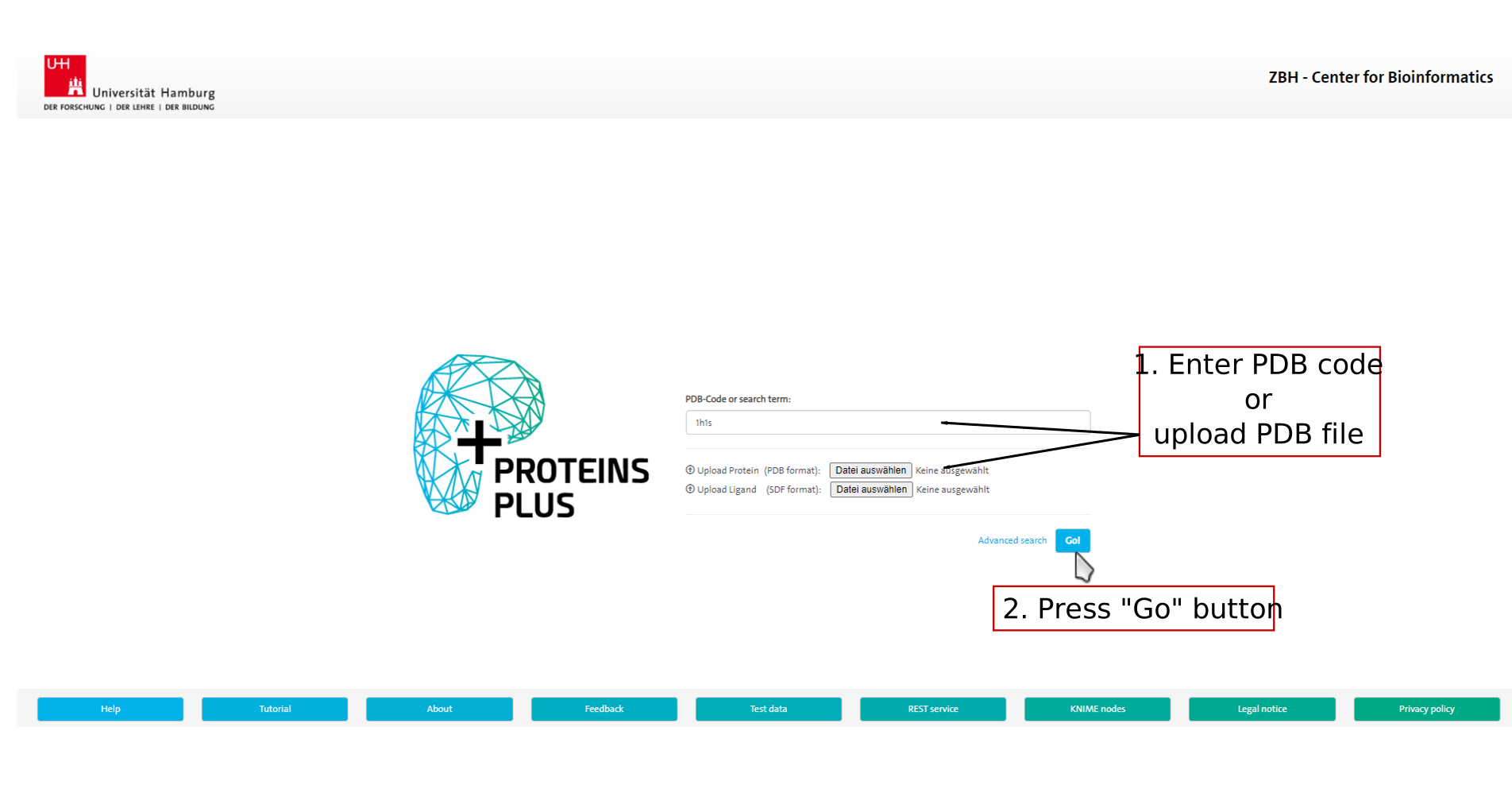
1. Target definition
GeoMine works on a structure of a
protein or a nucleic acid. In the first step, you need to define this structure
by selecting a structure from the Protein Data Bank (PDB) via its PDB code, from the AlphaFold database via its UniProt accession,
or by uploading a structure in PDB format. Additional ligand molecules can be provided
in SDF format.
Click on the image to jump to that page.
2. Set up 3D query selection
GeoMine performs textual, numerical, chemical and 3D searches
in ligand-based and empty pockets of the entire PDB dataset. Possible use cases are the
search for ligands for a given pocket or off-targets for a given ligand.
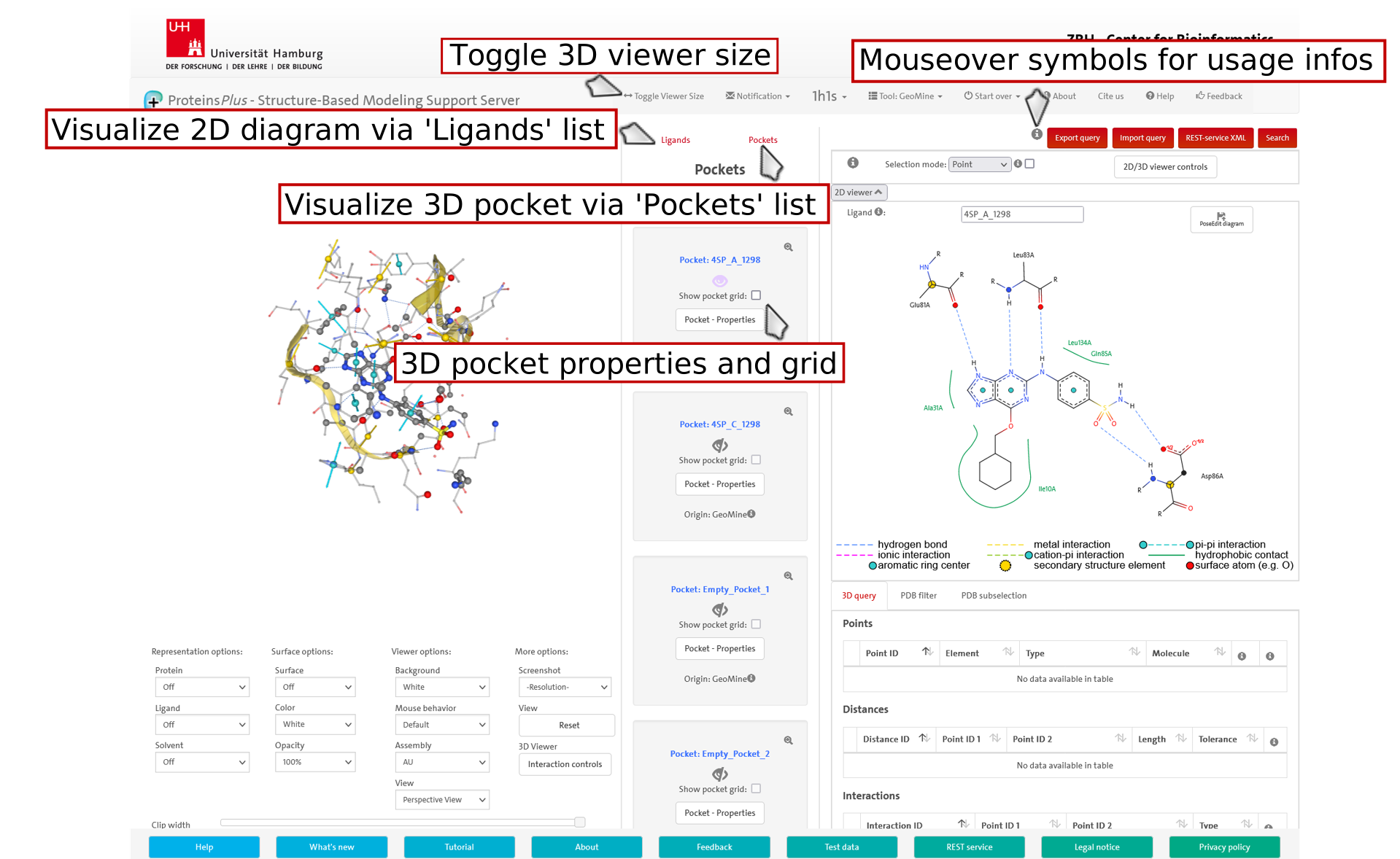
You can select a 3D query in a 3D pocket or 2D ligand interaction diagram or
both since the 2D and 3D viewer are synchronized.
You can also create a 3D query partially or completely from scratch.
The 2D ligand interaction diagrams are drawn by PoseEdit.
The 3D pockets are processed by Protoss, DoGSiteScorer and GeoMine.
Empty pockets with a volume less than 100 cubic angstrom are excluded and
their number is limited to twice the number of chains.
If DogSite could not calculate a pocket for a ligand, the radius pocket (6.5 angstrom)
of the ligand is added.
Empty pockets with a volume less than 100 cubic angstrom are excluded and
their number is limited to twice the number of chains.
Click on the image to jump to that page.
3.1 3D query selection
The 3D pockets contain water molecules, ions, ligands, other small molecules and interactions of
the following types: hydrogen bond, ionic, metal, pi-cation and pi-pi interactions.
Furthermore, GeoMine features that are selectable for the 3D query (binding site surface atoms,
aromatic ring centers and normals, end/mid alpha carbon atoms and directions of
helices and strands) are visualized.
Note that a 2D ligand interaction diagram is only an excerpt of the corresponding 3D pocket
being focused on the interactions of a specific ligand with residues and metals of the binding site.
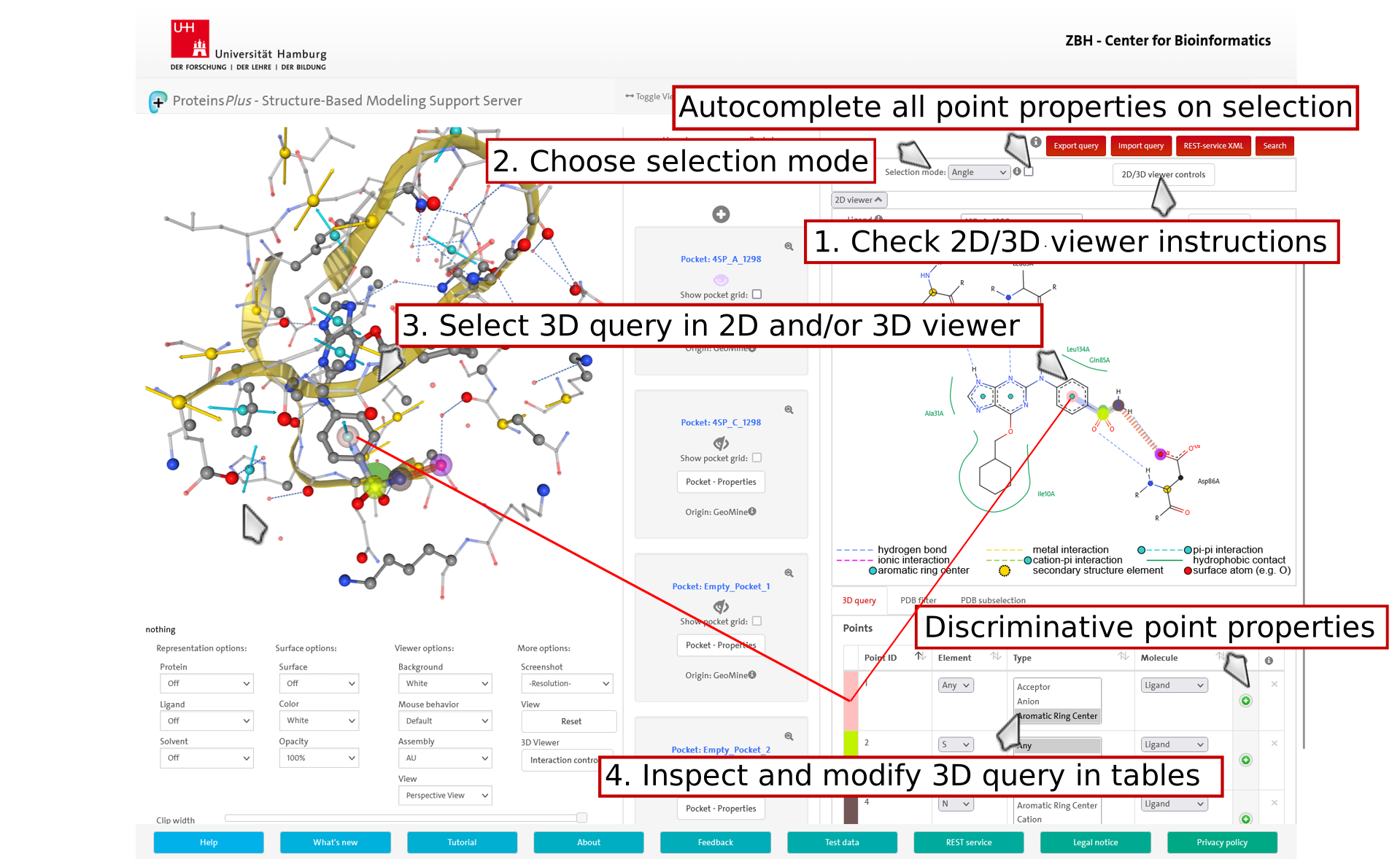
Choose a selection mode in order to select a 3D query in the 2D/3D viewer.
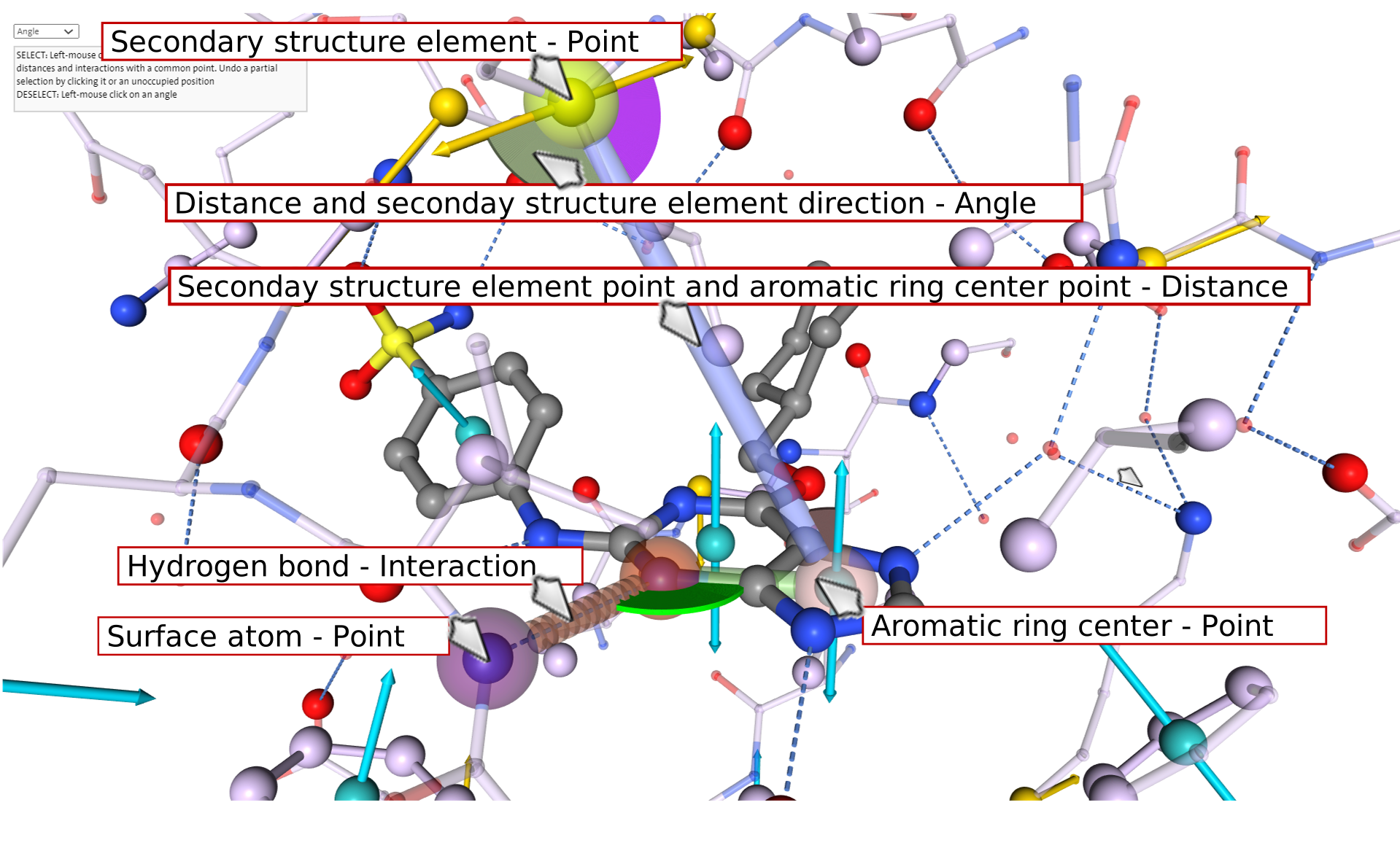
Point: Define points by clicking on (surface) atoms and aromatic ring centers or
secondary structure elements (mid/end alpha carbon atoms).
Surface atoms are represented by non transparent big spheres.
Undefined points can be added by clicking on an unoccupied position in the 3D viewer.
These points can subsequently be translated in the 2D/3D viewer to the desired position,
if the point is not connected by a distance or interaction.
In order to specify an undefined point as an aromatic ring center, its 'Element'
must be set to 'Any' and its 'Type' to 'Aromatic Ring Center'.
Points can be further specified by different attributes.
Distance/Interaction: Point-point constraints can be defined by clicking on a pair of points.
They can also be added directly by clicking on atoms, aromatic ring centers,
secondary structure elements and interactions. The corresponding points are automatically added.
The interaction type (e.g. Ionic) and point types (e.g. Cation/Anion) will be automatically set
if an interaction is available between the points.
The default distance tolerance value is 0.5 A.
Angle: Angle constraints can be defined between connected point-point
constraints by clicking on these two. Also ring normals of aromatic ring centers
and directions of secondary structure features
can be used for angle definition. The default angle tolerance is 15 degree.
The selected 3D query is loaded in tables for the inspection and further modification of its chemical and geometrical properties.
Regarding the 'Point' selection mode, the main properties of a point like the chemical element of an atom are automatically set.
You can specify that more discriminative point properties are automatically set
by marking the checkbox next to the selection mode dropdown.
Note that for a valid 3D query, all points must be part of at least one selected distance or interaction.
Besides the 3D query, a GeoMine search might also contain a PDB subselection,
which restricts the search to a user-defined set of PDB codes and
filters for textual/numerical properties of any component of the
PDB, e.g., the enzyme class or the hydrophobicity of a pocket.
All query types can be used independently or in combination.
Click 'Search' in any of the query tabs to start the GeoMine search.
Click 'Export query/Import query' for saving and reloading a GeoMine query
Click 'Rest-service XML' for saving a query as XML usable by the GeoMine REST-service.
Click on the image to jump to that page.
4.2 3D query selection
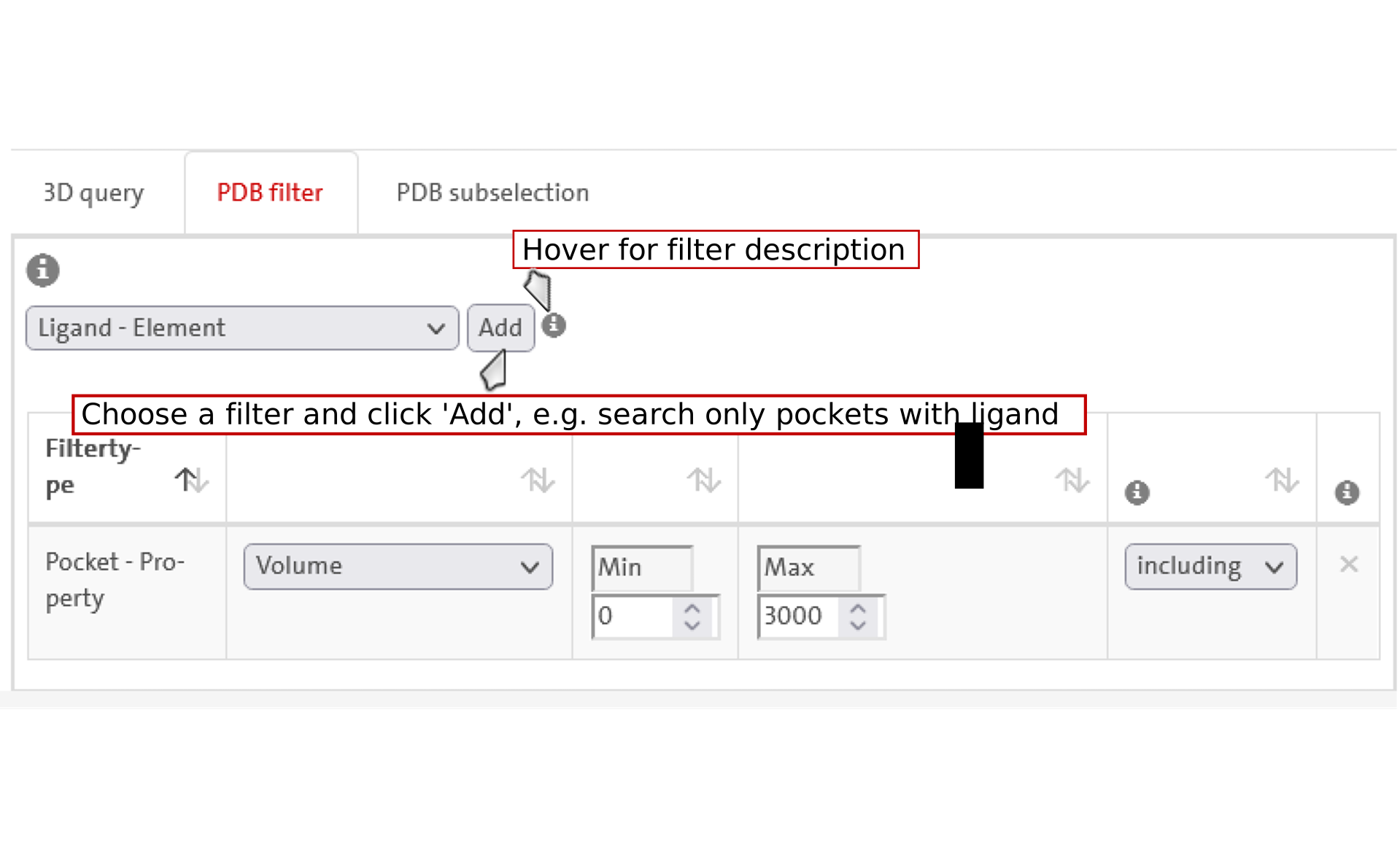
5. Textual/numerical property filter selection
Textual and numerical properties can be added to a table. The filters
can be negated and all defined filters have to be fulfilled for a match. For the
textual filters, a list of properties can be defined. Here, a match must fulfill
only one of these properties. You can inspect a description of the filter that
is currently selected in the dropdown by hovering over the info icon next to it.
Click on the image to jump to that page.
6. PDB codes selection
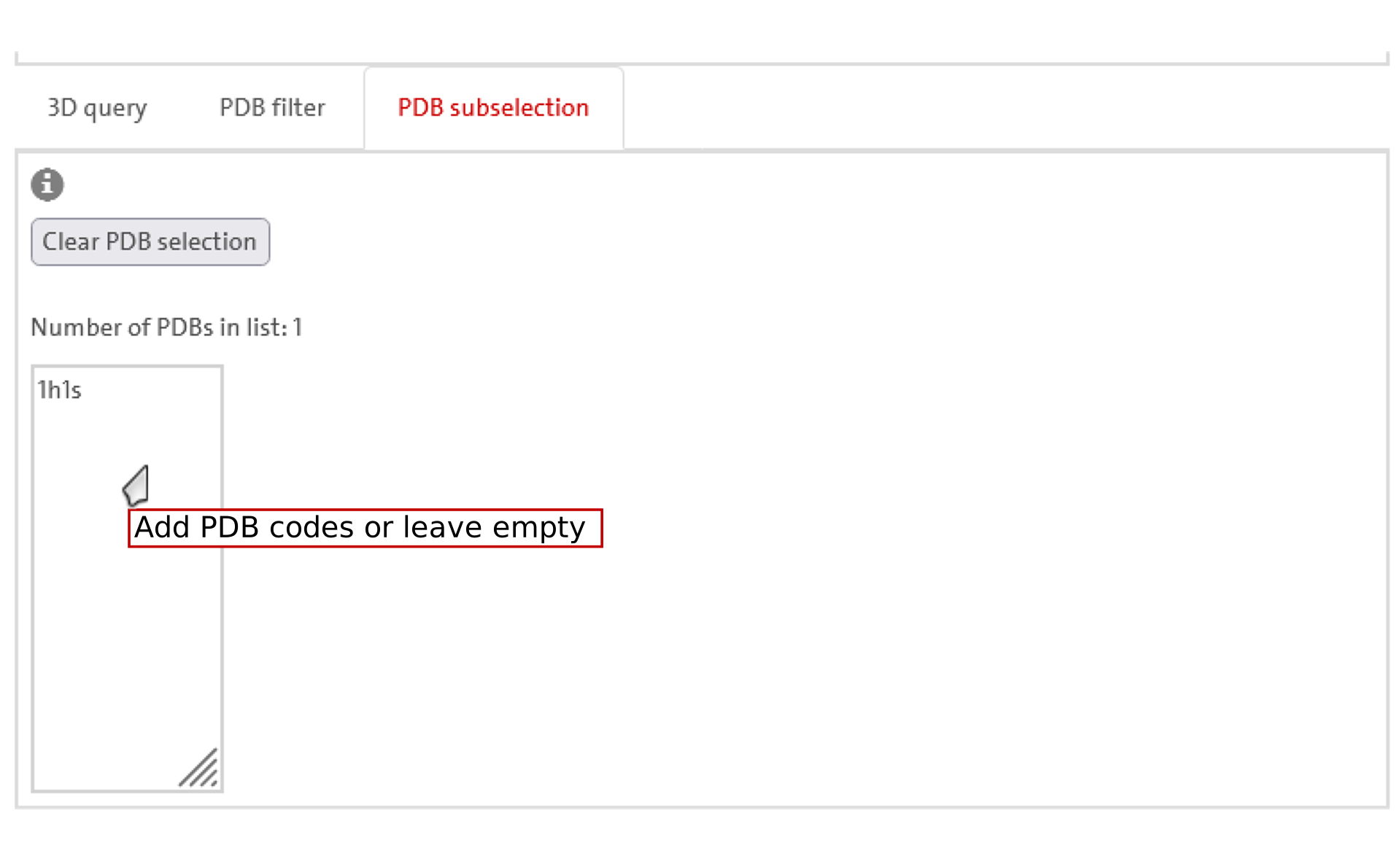
Put PDB codes (case insensitive) into the respective text box to limit
the search on a PDB subselection. Please separate the PDB codes by newlines.
If the text box is empty, the complete database will be searched. Using the result
refinement feature, all resulting PDB codes that matched the search criteria are
loaded into this text box for further refinement of the search and results.
Click on the image to jump to that page.
7. Result
A search process of successive query modifications and
result analyses can be performed using the refinement and history functionality.
The results can be refined by continuing the search in all found PDB codes
and with the current 3D query as a new starting point.
The results history allows browsing through prior and successive
search results obtained by refinement.
Visualizable results are presented in the results table. They can be displayed in the
3D viewer individually or together as superimpositions for visual analysis with
different representation options.
The number of visualizable results is limited to 150. The downloadable search statistic report
includes all detected results.
If the search contains a 3D query, the results table is initially sorted by RMSD.
The RMSD is calculated considering the 3D query points and the respective result points
that match the 3D query points.
The table can be searched, e.g., with respect to the PDB title, and its entries sorted, e.g.,
by their enzyme classes.
Besides the visual analysis of hits, a search statistics report containing common
structural aspects of the complete results list as well as
the pocket .pdb files and the table content as .json and .csv files of the 150
visualizable results can be downloaded.
If you want to access your results later (max 30 days), you can copy a link to the results.
Click on the image to jump to that page.

REST API Usage Documentation
API requests can be sent with the command line tool curl or with a browser rest
client plugin. The API allows the user to create jobs for the respective tools with the HTTP method POST, each
requiring a different set of parameters.
Calculation results can then be accessed and downloaded with the HTTP method GET.
The base url for current version (v1) is https://geomine.proteins.plus/api.
Create GeoMine Job
Creates a new GeoMine job passing json data in body and returns json data about the location of the results.
-
URL:
https://geomine.proteins.plus/api/geomine_rest
-
Method:
POST -
URL Params:
None
-
Data Params:
Required:
geomine=[hash] - Contains the following parameters: geomine_request=[string] - XML formatted query for the geomine search. An XML query can be generated using the Geomine GUI. 3D query Coordinates can be optionally set for the overlay of results. If not set, results are superimposed onto the first one. -
Success Response:
- Code: 202
Content:{ status_code: 202, message: "The job will be created in the specified location", location: "" }
- Code: 202
-
Error Response:
- Code: 400 BAD REQUEST
Content:{ status_code: 400, error: "Bad Request", message: "Parameter values must be strings" }
OR
- Code: 400 BAD REQUEST
Content:{ status_code: 400, error: "Bad Request", message: "Invalid number of parameters or incorrect parameter name" }
OR
- Code: 400 BAD REQUEST
Content:{ status_code: 400, error: "Bad Request", message: "SMARTS pattern of ... is not correct! Please correct your pattern." }
OR
- Code: 400 BAD REQUEST
Content:{ status_code: 400, error: "Bad Request", message: "Query is to unspecific. Please refine the search." }
OR
- Code: 400 BAD REQUEST
Content:{ status_code: 400, error: "Bad Request", message: "Job saving error" }
OR
- Code: 400 BAD REQUEST
Content:{ status_code: 400, error: "Bad Request", message: "Job loading error" }
OR
- Code: 429 TOO MANY REQUESTS
Content:{ status_code: 429, error: "Too Many Requests", message: "Throttle limit reached. Retry later." }
- Code: 400 BAD REQUEST
-
Sample Data:
{ -
Sample Call (curl):
Show GeomMine Job
Returns json data about a single Geomine job.
-
URL:
https://geomine.proteins.plus/api/geomine_rest/:id
-
Method:
GET -
URL Params:
Required:
id=[string] -
Data Params:
None
-
Success Response:
- Code: 200
Content:{ status_code: 200, result: "" }
OR
- Code: 202
Content:{ status_code: 202, message: "Job exists and is still in 'processing' state", location: "" }
- Code: 200
-
Error Response:
- Code: 400 BAD REQUEST
Content:{ status_code: 400, error: "Bad Request", message: "Job loading error" }
OR
- Code: 404 NOT FOUND
Content:{ status_code: 404, error: "Not Found", message: "Invalid ID" }
OR
- Code: 429 TOO MANY REQUESTS
Content:{ status_code: 429, error: "Too Many Requests", message: "Throttle limit reached. Retry later." }
- Code: 400 BAD REQUEST
-
Sample Call (curl):
curl https://geomine.proteins.plus/api/geomine_rest/ixenp5kLNHohrRbj56fbt4dd -
Output:
result - Search statistics
         Result pocket .pdbs
         Data for 3D viewer visualization (NGL) and table representation of search results (JSON-file)